3Com - Task Analaysis (Excerpt)
Overall Features to Include
Communication to the User· Depict network activity visually
· Test and diagnose hardware, cables, connection at every step; provide feedback to the user as to the results at each step
· Readout of transfer speed (both instantaneous and connect rate)
· Step the user through solutions when they encounter a problem
· Add a phone number for local MIS support
· Show how much time is left to complete a task
· Include some "show stopper" object in the box that reminds users to install the software before the hardware
· Offer a reward to the user for certain steps, in the form of tracking progress. (This idea comes from gaming, which is also a linear, goal oriented environment. Although the gaming audience is not the same as 3Com’s audience, they have some characteristics in common. Psychologically, both sets of users are interested in completing a goal speedily and accurately. The completion of this goal is a challenge, and is not incentive-based (e.g. to make someone do something). The idea of a reward represents a sense of accomplishment for the user, reinforcement of where they are in the installation, illustration of how far they’ve come, a map of their progress, and a sense of how well they’ve done so far.)
· Offer a sense of how other users might complete this step, by stating the "average" solution or the "average" environment. E.g. "75% of people have TCP/IP installed on their LAN"
· Clearly describe the problem a user is solving along with each troubleshooting point
· Provide a review/summary of the configuration
Cohesion
· Outline a clear path through the installation
· Avoid rebooting
· Use a visual/sound/editorial theme to hold the components together
· Show a chart with how much is finished and how much is left (provides positive
reinforcement)
· Allow user to fill out registration or view FAQ (some cranial entertainment)
during waits. Three waits (pre-install, registration, and downloading updates)
will be somewhat long. In the same interface, the user will be offered a variety
of other things to do, but the progress of the current installation will always
be visible for the user to monitor. This alternate activity will not be pushed
on the user.
· Emphasize speed and accuracy; not too many bells and whistles
· At the end of installation, introduce the user to the Dashboard
Software Agent
· Check platform settings to warn users of potential problems. (Marketing does
not want pre-installation to point out any of the situations where the card won’t
work at all, however, other types of problems should be pointed out.)
· Download network updates at modem registration time
· Sniff the packets to determine current network bindings, etc., and offer the user
a suggested choice
· Read default registration information from other installed applications
· Identify problems (e.g. IRQ conflicts) automatically. Either correct it
automatically, or outline the general procedure and point to the way to the
window where the user can solve it.
Overview
In addition, it is important to present the user with an overall picture of
the communication options on his/her laptop. This overview will show the linear
steps for installation. Such an overview provides users the context in which they
will work, allowing complete understanding of the task environment. Overviews, with
some sort of drill-down, filter, or zoom functionality, is being incorporated into
more and more successful software as interaction designers in the industry discover
the advantages to the user.
Brainstorm Categories
MapsProfessional Observations: The subway station and station map are familiar to users and provide an accessible affordance to the installed elements so users don’t have to spend time learning. Defining a destination for the user during installation has the same advantages of goal-oriented process definition. It avoids the perception that installation takes a long time. The journey and direction aspect of the idea is powerful; it shows movement and is mobile, like our audience. The idea of express trains to skip certain stations and the idea of transfer stations at the branches are also clear affordances the user can immediately grasp. Spatial memory as to what components appear at which stations will aid the user in quickly finding and navigating to the elements he/she wants to deal with. This idea supports the "hand-holding" concept 3Com wishes to promote by inviting users to "step on board" and the train will take them in the right direction. All the user has to do is "get from here to there." It also implies speed. The train assists the user, instead of challenging the user as in some of the game ideas, above. Furthermore, the idea is flexible in that the map doesn’t have to represent a subway, but any type of transportation. Finally, this concept emphasizes the parallel of travel and movement that our mobile users experience themselves.
Meeting the Requirements: [Installation Software] Linear steps down the line (separate nodes are separate side trips or stops the user can take); each station can contain one type of element. [Dashboard] Easy to represent in shorthand; can click to see details of status. [Audience] Is an affordance used by young and old, all types of people.
Professional Observations: The city map does not provide the express train or transfer station affordance for skipping or branching to other stations, so the Subway Map is a better than the City Map. Furthermore, it is low-tech, and old world. We could possibly combine a car with the City Map and enable the user to go out and "do errands" to install the software. Alternatively, we could put the City Map inside a car. (See "Dashboard with Trip Navigator" below.)
Meeting the Requirements: [Installation Software] No steps; each location can represent a certain element. [Dashboard] Can represent in shorthand; can click to see details of status.
Professional Observations: The network diagram has the advantage that it represents exactly what components the user will interact with, including their hardware-based relationship to one another. However, the home user, as defined in the 3Com research, will not have familiarity with such network diagrams. The MIS Managers will, however, be intimately familiar with network diagrams. Users have the opportunity to actually learn how a network or modem is laid out as they use the software. However, there is no value-add besides the graphics, creatively, from Ikonic. Also, we lose the "vehicle" or "going somewhere" feel.
Meeting the Requirements: [Installation Software] Can make steps out of the diagram; each section is related to one element. [Dashboard] Easy to represent in shorthand; can click to see details of status.
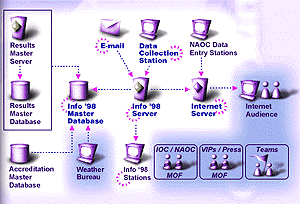
Example of icons that can be used with Network Diagram:
(icon design by Kaori Ikeda)